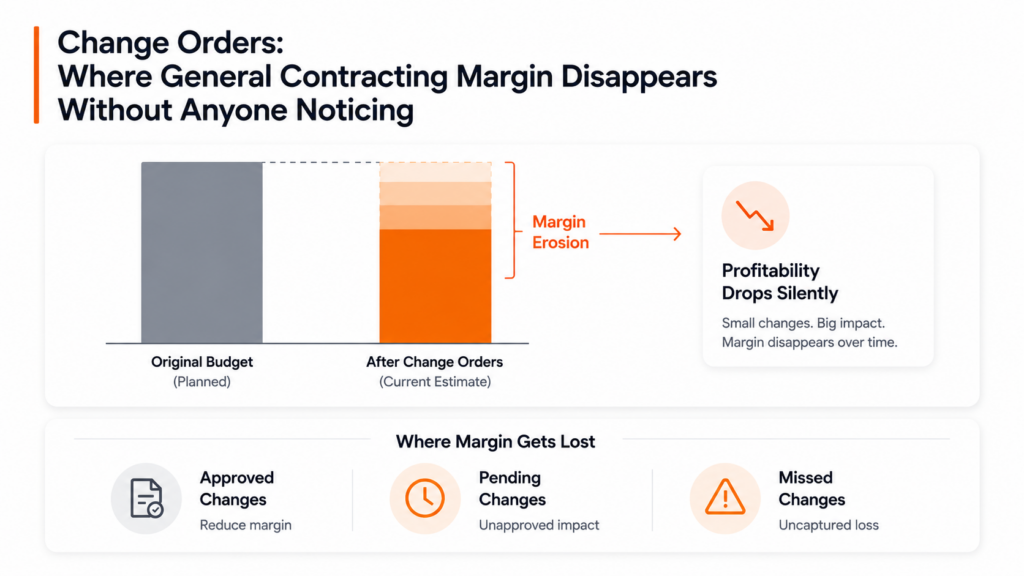
My books look fine. Why does my bank account still feel tight?
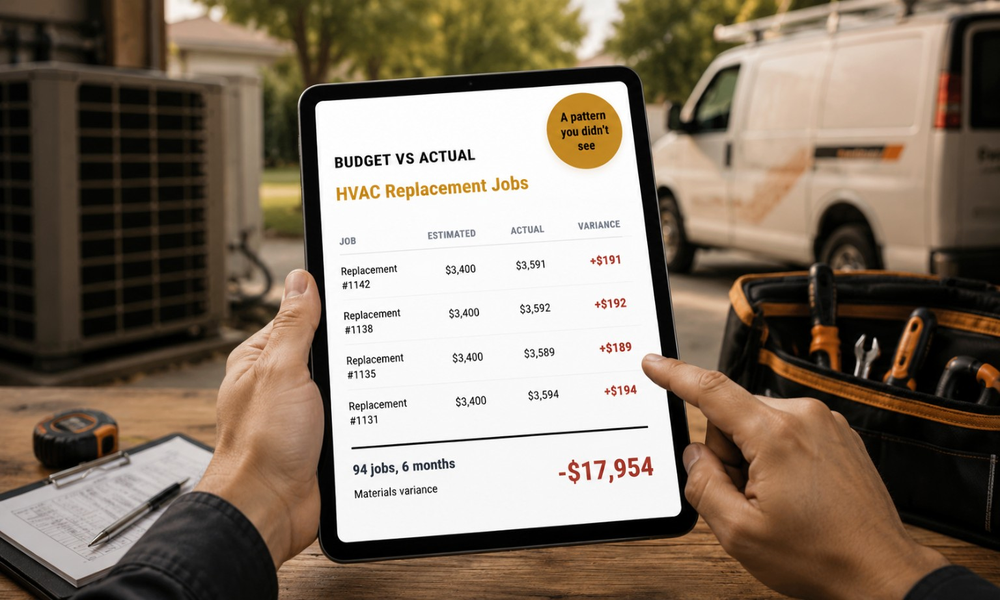
Your books show revenue, expenses, and a gross margin number. What they don’t show is which job types are pulling that margin down. If your HVAC replacement jobs are running $191 over on materials per job and you completed 94 of them over six months, that’s $17,954 in margin you lost without a single line in your P&L pointing to it.
What’s the difference between job costing and regular accounting?
Accounting tells you how the business did last quarter. Job costing tells you whether the job you finished yesterday made money. Your accountant works at the business level, after that fact. Job costing works at the job level, while you can still do something about what it finds. The two aren’t in conflict. They answer different questions.
Does QuickBooks already do this?
QuickBooks tracks your income and expenses at the business level. It doesn’t compare estimated job cost against actual job cost, by job type, as the jobs close. You can build workarounds in QuickBooks, and some owners spend hours on Fridays trying to do exactly that. My Workbelt’s QuickBooks integration was reviewed and validated by a QuickBooks ProAdvisor. The sync is two-way. It adds job-level cost tracking to what QuickBooks already does well. It doesn’t replace your books.
Will this mess up my QuickBooks?
No. The sync is two-way, and we don’t ship it until your bookkeeper validates it. Every sync action is logged, so your bookkeeper can audit the history and reverse any change. Your existing Chart of Accounts maps to My Workbelt during setup. You don’t restructure your books to use the platform.
Which job types should I be tracking first?
Start with your highest-volume job type. If you run HVAC replacements every week, that’s where a small per-job overrun compounds fastest. One dollar over on materials per job sounds like nothing. Across 94 jobs in six months, it’s a real number. Once you have your highest-volume type dialed in, add the next. Your CSM helps you set the order during the setup.
How do I know if my pricing is the problem or if my material costs are?
Budget vs. Actual separates them. You can see whether the labor came in overbudget, whether materials ran hot, or whether the job took longer than the template assumed. Most owners find it’s more than one thing. But you can’t separate them until the data is organized at the job level. Gut feel will tell you something is off. Job costing tells you were.
How does growth review connect to job costing?
The Growth Review is a monthly call, 30 to 60 minutes, between you and your named CSM. They come prepared with your Budget vs. Actual data for the month. You leave with a short list of decisions. The software surfaces what’s happening in your numbers. The Growth Review is a conversation about what to do about it. Data without that conversation is just another report nobody acts on.
How long does it take to see something useful in the numbers?
Most clients see a preliminary margin of observation within the first 14 days, once a handful of jobs are logged. The first Growth Review on day 30 is where the pattern becomes clear enough to act on. We’ve never done a first Growth Review without finding at least one thing worth adjusting.
Is this only for HVAC, or does it work for plumbing and electrical too?
It works for all three. The Budget vs. Actual is designed for replacement and service to call profitability in HVAC, where margin compression shows up first. For plumbing, it handles both flat-rate and hourly work, and it’s especially useful for separating commercial from residential margins. For electrical, it catches labor-hour creep on quoted projects, which is the most common way electrical contractors lose money without realizing it.
What does it cost, and is there a guarantee?
The setup is $500 once. Subscription tiers are on the pricing page. Every line item is on the site before you book a demo. If you don’t find at least one hidden profit opportunity in your first 60 days, we refund every dollar you’ve paid. No questions, no fine print, no clawback on the setup fee. If you want to see what job-level cost tracking looks like on your trade and your job types, you can book a demo at myworkbelt.com.