


Quick Links
- You priced soil you couldn’t see
- Why the $820 stays hidden
- What excavation job costing shows you that a bank balance can’t
- What a rock clause is
- What goes into the clause
- Where excavation estimating software fits
- Run the check on your own numbers
- Questions excavation owners ask about rock clauses
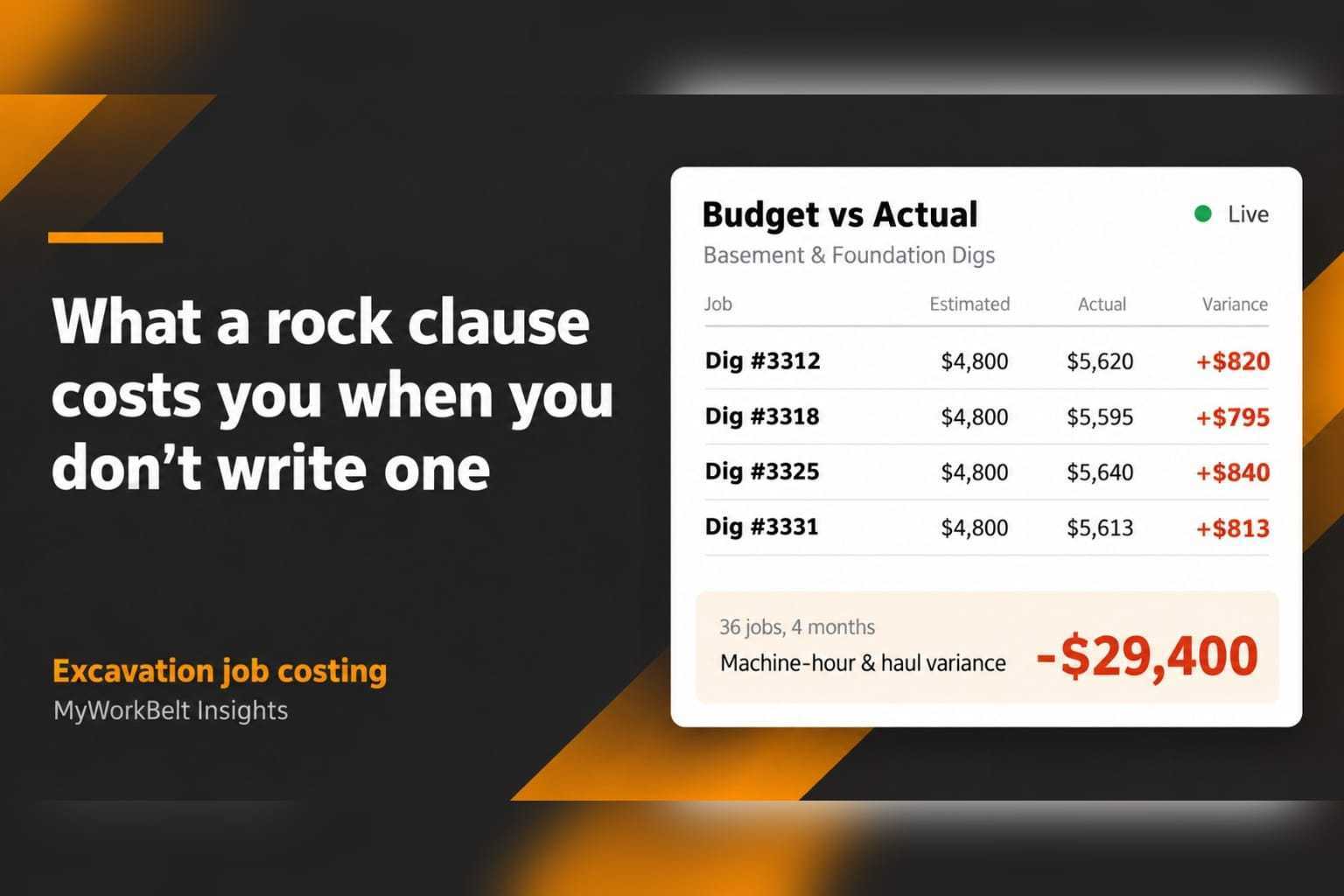
Thirty-six foundation digs. Every one bid at $4,800. Every one finished about $820 over estimate on machine hours and hauling.
That is $29,400 in four months, and nothing in your bank balance flagged it.
If you run an excavation business, you know how this goes. Revenue looks fine. Invoices get paid. Then the year closes and the margin is thinner than the work says it should be. Excavation job costing is how you find out why. Here, the answer was one line missing from the estimate.
This scenario is illustrative. The numbers reflect what excavation owners describe at a first Growth Review.
You priced soil you couldn’t see
A foundation dig gets bid off soil type and depth. You have a survey, maybe a test hole, and the lot itself. You do not have a view of the ledge two feet below the footing line. OSHA’s excavation rules already require a competent person to classify soil on site. The estimate deserves the same attention before the machine shows up.
When the bucket finds rock, the 6 hours you estimated turn into a day of hammer work, a second dump run, and a crew burning machine time while you call the customer. The base price was fair for the dirt on the plan. The dirt in the ground was different, and nothing in the estimate said who pays for the difference.
What excavation job costing shows you that a bank balance can’t
Excavation job costing compares what you estimated a job would cost with what it cost. The machine hours, labor, and hauling are tracked per site, grouped by job type, by crew, and by machine. Budget vs Actual does this inside MyWorkBelt.
Group the same season by job type, and the picture changes.
| Job type | Margin, last 90 days |
| Utility trenching | +27% |
| Land clearing | +22% |
| Grading and site prep | +17% |
| Basement and foundation digs | -4% |
| Rock and unmarked-line jobs | -9% |
Trenching and land clearing carry the business. Foundation digs lose money at a bid rate you have used for years, and rock and unmarked-line jobs lose more. Your company-wide margin averaged all of it into a number that felt acceptable.
What a rock clause is
A rock clause is a line in your estimate that prices ground you could not see when you bid. If your crew hits rock, the extra work is billed at a stated rate as a change order, per hour or per cubic yard. If they don’t hit rock, the customer pays nothing extra.
On a 2,400 sq ft foundation dig, it looks like this:
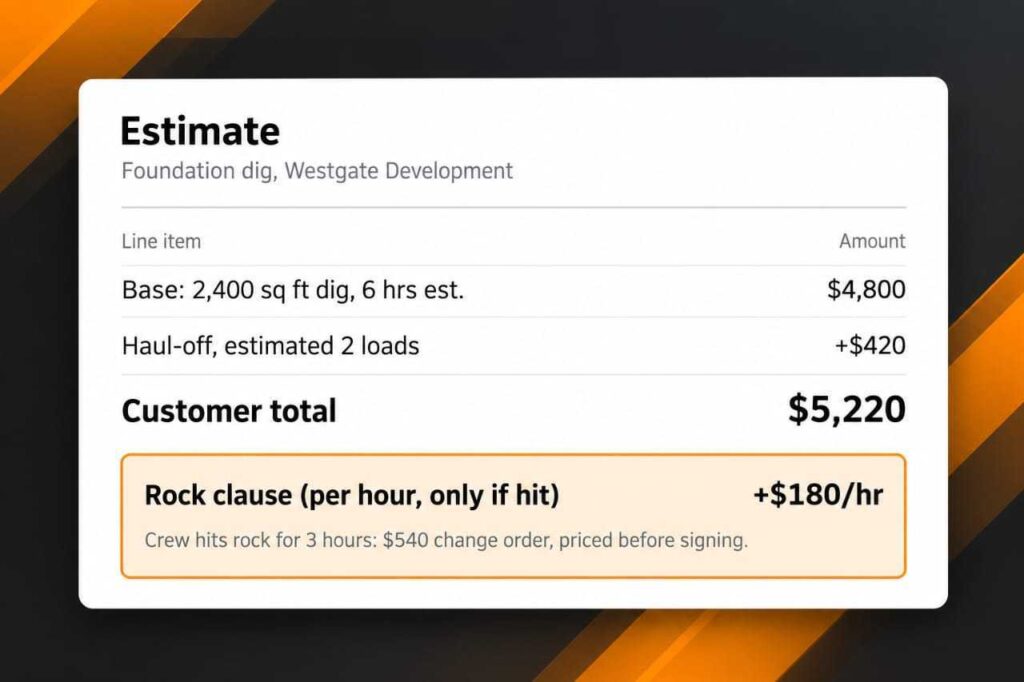
| Line item | Amount |
| Base: 2,400 sq ft dig, 6 hrs est. | $4,800 |
| Haul-off, estimated 2 loads | +$420 |
| Customer total | $5,220 |
| Rock clause (per hour, only if hit) | +$180/hr |
If the crew hits rock for 3 hours, the invoice reads $5,220 plus a $540 change order. The customer saw the $180 rate before signing. Nobody is surprised.
What goes into the clause
- Define rock. Use wording your crew can verify on site, like material that needs a hydraulic hammer or ripper to remove. Have your attorney review the language.
- Set the rate from your cost. Start with what an hour of rock work costs you: machine, operator, fuel, and the extra hauling. Add your margin. Last season’s machine-hour variance shows how far off your current hourly assumptions are.
- Price unmarked lines on their own. 811 covers public utilities. It does not locate private lines on the property, like a well line, irrigation, or a lateral to an outbuilding.
- Require approval before the hammer starts. The crew calls the office. The office calls the customer. A text or e-signature confirming the change order goes on file before work continues.
- Document the hit. Photos, logged machine hours, and a time stamp go on the work order.
- Put it on the face of the estimate. A clause buried on page four gets argued at invoice time.
If you sub under a general contractor or bid public work, read what already flows down to you. Differing site conditions clauses are standard in many contracts, and the federal version, FAR 52.236-2, is a useful reference for how they are written.
Some customers will push back. A GC may take a bid from someone who left the clause out, and you lose that job. You keep the margin on the rest.
Where excavation estimating software fits
Excavation estimating software earns its place when the clause lives in the template. Build the dig quote once, with line items for soil conditions, estimated machine hours, and hauling. Attach the rock clause. Every estimate that leaves your office carries it, and quotes that sit unanswered get flagged before they turn into lost work. In MyWorkBelt, your Client Success Manager builds the clause into your estimate templates during setup.
The estimate covers the front half. Budget vs Actual covers the rest. After the crew closes a dig, it captures what machine hours, labor, and hauling cost and shows the gap against your estimate. If the rate on your clause is wrong, the next 20 digs tell you.
Then comes the monthly Growth Review. Your CSM has watched your numbers all month. They show you the foundation digs running over on machine hours, and you decide what to change on the next bid: rock clauses, rates, equipment allocation. That is the loop that found the $29,400 above.
Run the check on your own numbers
Pull your last 12 months of foundation digs. Sort by the gap between estimated and actual machine hours. If you see $800 a dig, you know what the next bid needs to say.
Or let us run it on your jobs. We’ll show you Budget vs Actual on your excavation operation, with your sites and your job mix. Not generic demo data. Book a demo
If you don’t find at least one hidden profit opportunity in your first 60 days, we refund every dollar you’ve paid us. No questions, no fine print, no clawback on the setup fee.
Questions excavation owners ask about rock clauses
What is a rock clause in an excavation estimate? A line in the estimate that prices ground you could not see when you bid. If the crew hits rock, the extra work bills at a stated rate as a change order. If they don’t, the customer pays nothing extra.
How do you price rock in an excavation bid? Start with what an hour of rock work costs you: machine, operator, fuel, and hauling. Add your margin. Then check last season’s Budget vs Actual to see how far machine hours ran over on similar jobs.
What should excavation estimating software do? Hold line items for soil conditions, machine hours, and hauling. Carry the rock clause on every dig quote. Flag quotes that sit unanswered. Then compare the estimate to the actual so you know whether your rates are right.
How do you track excavation job costs by machine hour? Capture estimated machine hours before the job and logged hours from the field after it, then compare by job type and by machine. In MyWorkbelt, crews log machine hours on the work order and Budget vs Actual shows the gap.